Custom UI: Adding a custom ribbon tab
An example of adding a custom ribbon tab to a rust_xlsxwriter file using a
Custom UI XML file.
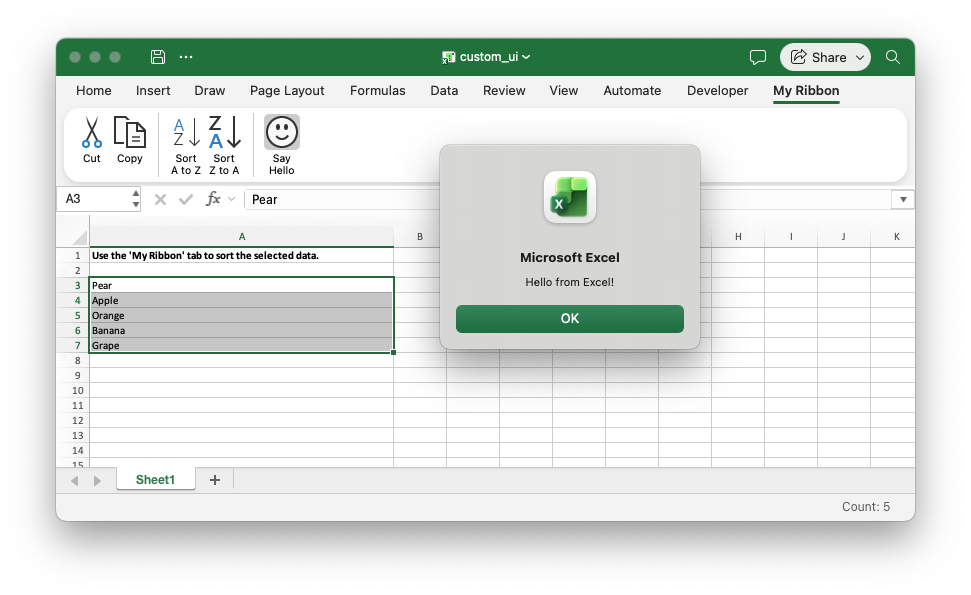
The custom tab contains built-in Excel commands and a button that runs a macro from a VBA project file. See Working with Custom UI elements/Ribbons for more details.
Image of the output file:
use rust_xlsxwriter::{Format, Workbook, XlsxError};

fn main() -> Result<(), XlsxError> {
    // Create a new Excel file object.
    let mut workbook = Workbook::new();

    // Add the Custom UI XML file for the Excel 2010+ ribbon.
    workbook.add_custom_ui("examples/customUI14.xml")?;

    // Add the VBA project for the macro on the custom ribbon tab. This was
    // extracted from an Excel file using the vba_extract utility.
    workbook.add_vba_project("examples/vbaProject_custom_ui.bin")?;

    // Add a worksheet.
    let worksheet = workbook.add_worksheet();

    // Widen the first column for clarity.
    worksheet.set_column_width(0, 50)?;

    // Show some instructions for the end user.
    let bold = Format::new().set_bold();
    let message = "Use the 'My Ribbon' tab to sort the selected data.";
    worksheet.write_with_format(0, 0, message, &bold)?;

    // Add some data to sort.
    let fruits = ["Pear", "Apple", "Orange", "Banana", "Grape"];
    worksheet.write_column(2, 0, fruits)?;

    // Preselect the data so it is ready to sort.
    worksheet.set_selection(2, 0, 6, 0)?;

    // Save the file to disk. Note the `.xlsm` extension. This is required by
    // Excel for files with VBA macros or it will raise a warning.
    workbook.save("custom_ui.xlsm")?;

    Ok(())
}